
Daylight Saving Time: Will Your Phone Update Automatically?
Yes, your phone should change to or from daylight saving time automatically. Unless you have a really old Android phone or if you have previously meddled with the time and date settings, you shouldn't have to do anything.
What is daylight saving time?
Daylight saving time is a practice that occurs twice a year in many parts of the world, including the United States. During this period, clocks are adjusted forward by one hour in the spring and then set back by one hour in the fall. The exact dates vary depending on where you live, which can sometimes make it confusing for people. This adjustment often leads to questions about how to ensure that devices like Android phones remain accurate after the time change.
When does daylight saving time begin?
In 2026, daylight saving time will begin on Sunday, March 8, at 2 a.m. local time. At this moment, clocks will move forward by one hour, effectively skipping from 2 a.m. to 3 a.m. While this means we lose an hour of sleep, it also results in longer evenings with more natural light. For many, this shift makes the transition into nighttime feel less abrupt compared to when daylight saving time ends.
Daylight saving time will end on Sunday, November 1, at 2 a.m. local time. At this point, clocks will be moved back by one hour, so the time will go directly from 1:59 a.m. to 1 a.m. This gives people an extra hour of sleep, but it also means that it will get darker earlier in the day.
Will my phone change to/from daylight saving time automatically?
The good news is that you likely won’t need to do anything. Unless you have manually changed your phone’s time and date settings, your Android device should automatically adjust for daylight saving time. Your phone will check the network for the correct time and update itself overnight, ensuring that features like calendars and alarms remain accurate.
This automatic adjustment also applies when other regions around the world change their clocks, or if you travel to different time zones. It helps your phone maintain the correct local time, whether you’re driving across state lines or flying to another country.
What if my phone is powered down or turned off?
If your phone is turned off during the time change, it should automatically correct itself once it is turned on and reconnects to your cellular network. If you encounter any issues with your phone’s settings, it’s a good idea to contact your carrier for assistance.
How to check your daylight saving time settings on a Pixel or stock Android phone
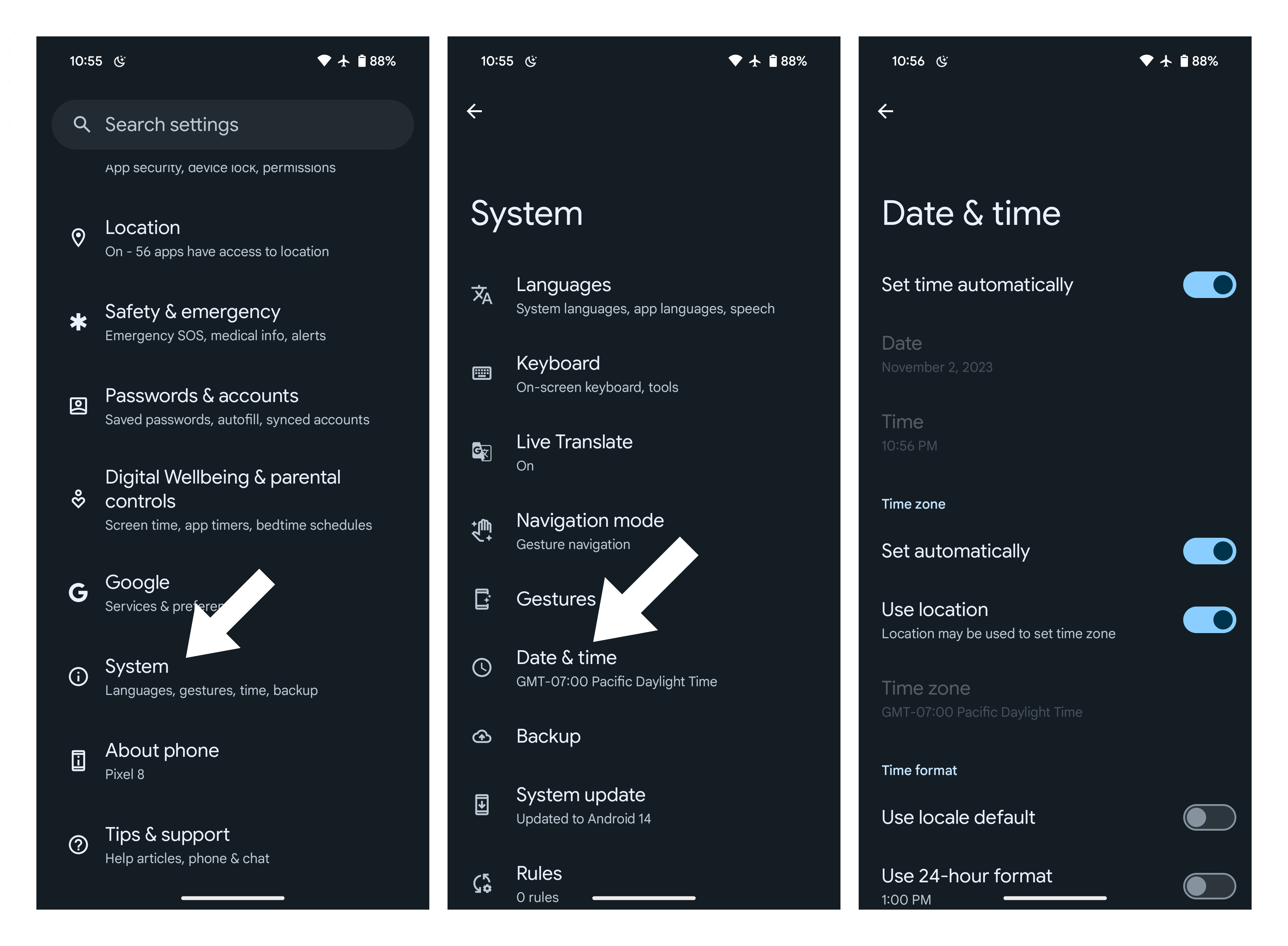
If you're concerned about your phone's ability to handle the time change, it's easy to verify that your settings are correct. On a Pixel phone or another Android device running "stock" Android, follow these steps:
- Open up your Settings app.
- Scroll down and tap on System.
- Tap on Date & time.
- Toggle the options to Set time automatically. Toggle Use location to enhance accuracy.
How to check your daylight saving time settings on a Galaxy phone
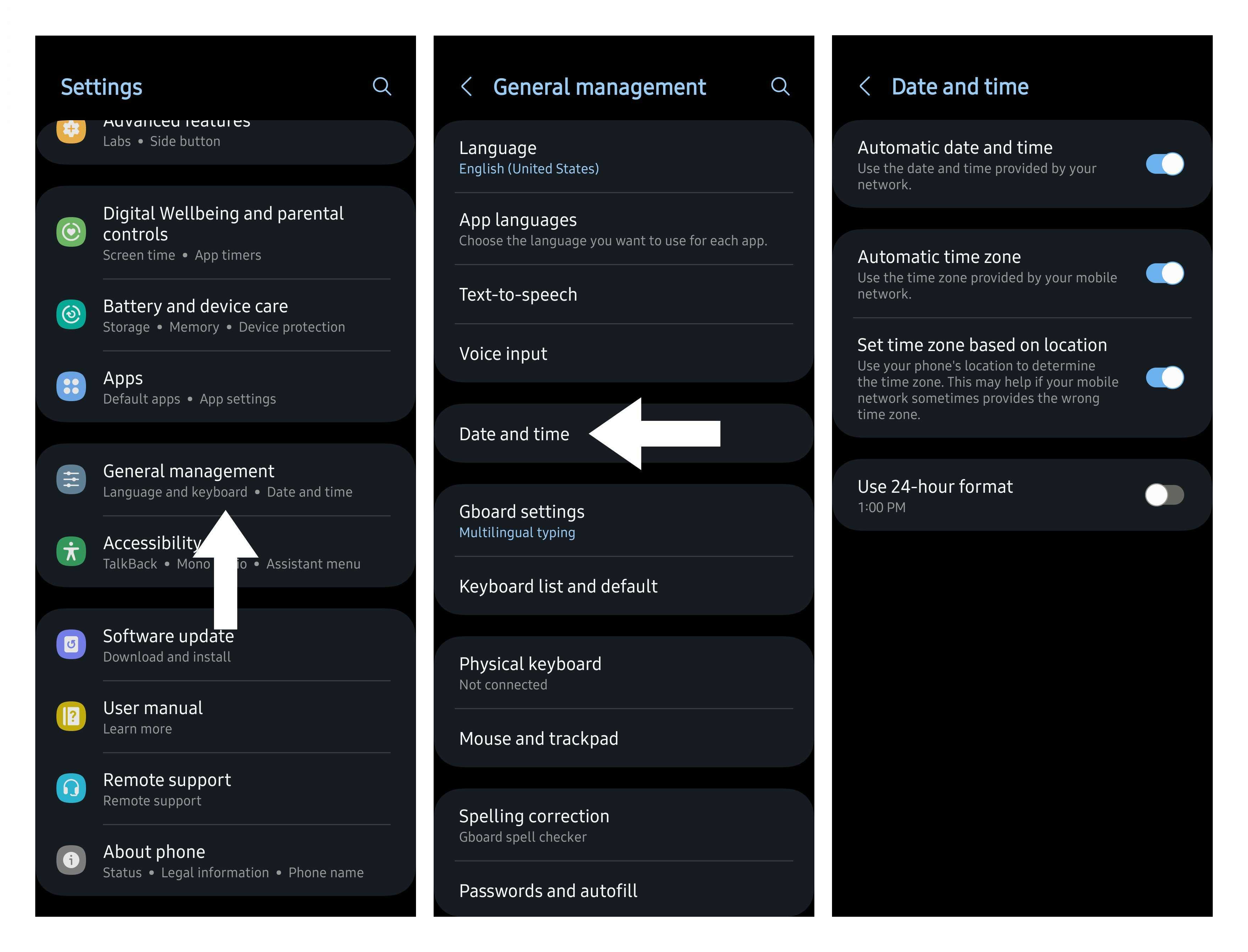
Samsung Galaxy phones may have slightly different steps. Here's how to check your settings on a Samsung Galaxy phone:
- Open the Settings app.
- Scroll down and tap on General management.
- Tap on Date and time.
- Toggle on the Automatic date and time setting.
- Toggle on the Automatic time zone setting. You can also toggle the option to Set time zone based on location to enhance accuracy.
Sweet dreams!
Now that your Android phone is set to automatically update for daylight saving time, you can rest easy knowing that you won’t miss your alarm come Monday morning.
Phone deals:
Best Buy | Walmart | Samsung | Amazon | Verizon | AT&T
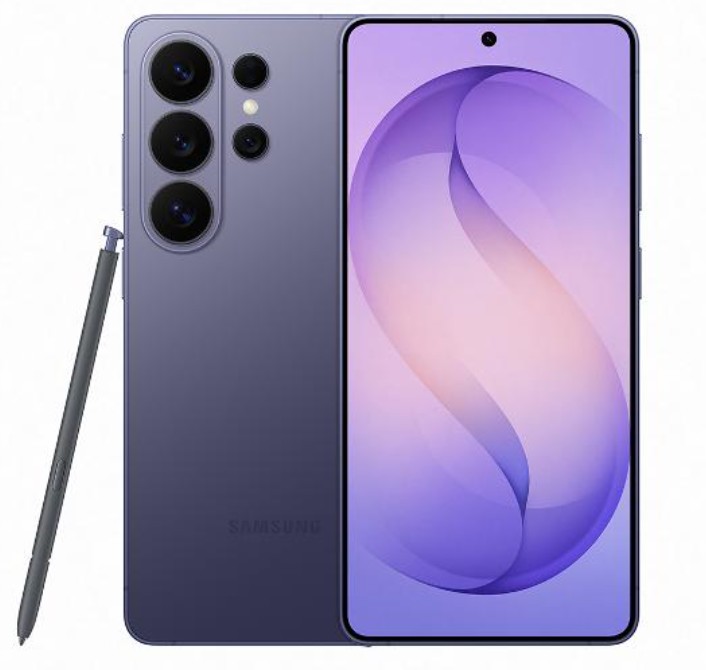
Samsung Galaxy S26 Ultra
Keep it secret, keep it safe
The Galaxy S26 Ultra is Samsung's latest and most powerful smartphone, featuring the latest Snapdragon chip, impressive new agentic AI features, and a new Privacy Display that can hide the contents of your screen from prying eyes, making it the ultimate privacy smartphone!
Like this article? For more stories like this, follow us on MSN by clicking the +Follow button at the top of this page.
Posting Komentar untuk "Daylight Saving Time: Will Your Phone Update Automatically?"
Please Leave a wise comment, Thank you